At work, I built a pipeline to extract questions from math exams so they could be used to create new questions. Extracting the text worked reasonably well, but many problems also depended on diagrams, graphs, or tables. A question wasn’t complete unless its visual elements were included in the right places.
Generating replacements couldn’t reliably reproduce the original visuals, so I decided to crop them from the exam pages. The challenge was finding each image and connecting it to the right question.
I started with a three-stage pipeline. Later, I found that a multimodal LLM could extract the questions and locate their images in the same request. That let me remove the separate detection and matching stages, while still using the original images.
The original pipeline
My first approach split the work into three stages:
- Extract the questions. Gemini 2.5 read the page and returned the question structure, with image slots in the appropriate places.
- Find and crop the images. An OCR model detected image regions, and the application cropped them from the page.
- Match images to questions. Gemini 2.5 matched the cropped images to the slots in the extracted questions.
This worked around the need to recreate diagrams, but it also meant passing intermediate results between several stages. I began to wonder: if a model could already see the page and understand the questions, could it also tell me where their images were?
Asking for questions and image locations together
I tried asking GPT-6.1 Terra for both the question structure and the bounding boxes of the associated images. A bounding box is simply the rectangular region around an image, represented by coordinates on the page.
For example, a question might contain text, a graph, and answer choices. Instead of returning an empty slot for the graph and matching it later, the model can return the graph’s location as part of the question structure. The application then uses those coordinates to crop and save the graph from the original page.
The revised flow looks like this:
Exam page
  → Multimodal LLM: extract questions and associated image locations
  → Application: crop and save the images from the original page
In the pages below, the red boxes show the image regions the model identified:
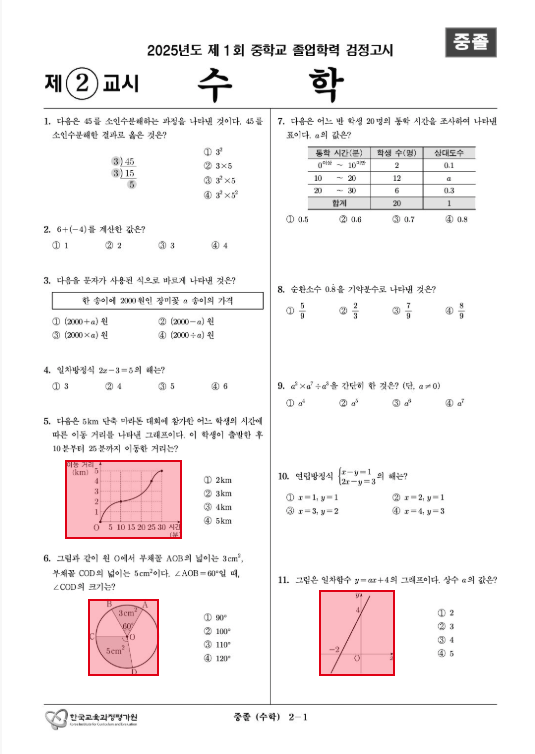
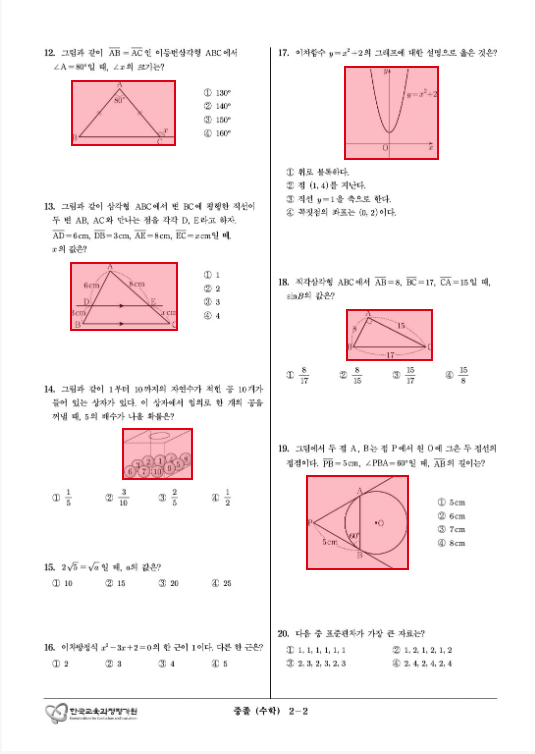
The locations looked accurate in the examples I tried. The improvement is one model request per page, not one operation: the application still has to crop and save the images. I also need to test more exams and complex layouts before drawing broader conclusions about accuracy.
A note on coordinates
Different models can return bounding boxes in different coordinate systems. In my tests, GPT models returned coordinates based on the image dimensions, while Gemini returned coordinates normalized to a 0–1000 range. For normalized coordinates, I can convert each corner to pixels like this:
pixel_x = normalized_x / 1000 × image_width
pixel_y = normalized_y / 1000 × image_height
It’s important to check the actual response format, including the order of the coordinates, and clamp the resulting box to the image bounds. If an image has been resized during preprocessing, the dimensions used for conversion also need to match the image the coordinates refer to.
I also found that Gemini 3.5 Flash Lite and later versions extracted bounding boxes well in my tests. I couldn’t retest Gemini 2.5 Flash because it was deprecated at the time, so I don’t know whether I could have simplified the pipeline this way with the original model.
What might this save?
Fewer model calls could also mean lower costs. I didn’t measure the two pipelines head-to-head, but I had cost and timing data from two runs of the same separate workload:
| Metric | Gemini 3.8 Flash | GPT-6.1 Terra |
|---|---|---|
| Calls | 124 | 117 |
| Total cost | $1.0209 | $0.4389 |
| Average cost per call | $0.00823 | $0.00375 |
| Average response time | 13.34 s | 10.53 s |
| Total execution time | 4 min 40.7 s | 3 min 27.3 s |
In these runs, Terra’s total cost was about 57.0% lower, and its run finished 73.4 seconds sooner. Gemini’s input and output token prices were lower, but Terra’s total cost, including thinking tokens, was lower in this measurement. The number of tokens used matters as well as their price.
I originally built the three-stage pipeline with Gemini 2.5, then updated it to Gemini 3.8. To estimate extraction costs, I applied the average per-call costs measured above to the old and new pipeline structures.
| Pipeline | Estimated cost per page |
|---|---|
| Previous: 2 Gemini calls × $0.00823 | $0.01646 |
| Revised: 1 Terra call | $0.00375 |
| Estimated savings | $0.01271 |
That’s an estimated 77.2% reduction in model-call costs, or about $12.71 per 1,000 pages. The estimate applies the same Gemini average to both calls. It treats the OCR model, which ran on an in-house PC, as having no additional API cost; it excludes hardware, electricity, operations, and retries. A reliable comparison would measure both pipelines under the same conditions, including output quality.
A separate experiment: generating SVG diagrams
Cropping was my choice for preserving the original visuals. Separately, I also tried having a model represent diagrams as SVGs.
SVGs describe shapes and text using editable coordinates and attributes. That makes generating a diagram more like writing code than generating pixels. Here are examples based on the graph and sectors on the first exam page, and the triangle and circle on the second:
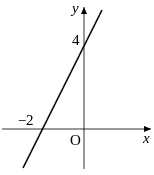
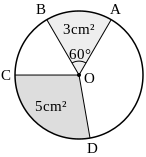
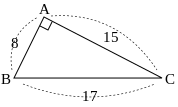
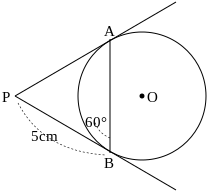
For one SVG task, I compared the two models:
| Metric | GPT-6.1 Terra | Gemini 3.8 Flash |
|---|---|---|
| Drawing elements | 10 | 16 |
| SVG size | 0.8 KB | 2.6 KB |
| Output tokens | 1,370 | 8,141 |
| Cost | $0.0071 | $0.0307 |
In this example, Terra’s output was more concise and cost about 76.9% less. On visual inspection, I also thought it represented the diagram more accurately. But fewer elements and a smaller file don’t necessarily mean better quality, and a plausible-looking SVG can still have incorrect coordinates or geometric relationships. The accuracy observation is based on a single case, so generated diagrams still need review.
Takeaway
The most useful change wasn’t simply switching models. It was revisiting where I had divided the work: once a model could identify image locations as well as extract questions, detection and matching no longer had to be separate stages.